
Common belt weigher faults trace back to a short list of causes: material build-up on the weigh frame, a drifting zero, a worn or slipping speed sensor, a tired load cell or damaged cable, mechanical wear in the rollers and tie rods, or an integrator problem that has nothing to do with the scale itself. A belt weigher (also called a weightometer, belt scale, or conveyor belt scale) works out tonnes by multiplying the load on a short weighing span by belt speed, so anything that changes the load signal, the speed signal, or the geometry the belt sits in shows up as an error. Below we group the faults we see most on mine and quarry sites by symptom: what we find, the likely causes in order, the fix, and when to call us rather than keep adjusting.
Figures on this page are rough field guides, not limits for every scale.
Before you touch anything, isolate the conveyor. Follow your site’s lockout and tagout procedure, prove the belt is dead, and keep well clear of the weigh frame, rollers and speed sensor until it is. A belt that can start is far more dangerous than a weigher reading a bit high. If you are not trained and authorised to work on the conveyor, stop here and call us on 1300 101 666. Nothing on this page is worth an injury.
Why is my belt weigher reading tonnes on an empty belt?
A weigher that clocks up tonnes on a bare belt has picked up a zero, or tare, offset. The usual culprits are build-up on the weighing carriage or under the weigh idlers, carryback on the return side of the belt, water lying on the belt, or a mechanical bind stopping the frame from moving freely. This is one of our most frequent calls, so it has its own detailed page: see Why is my belt weigher reading a flow rate on an empty belt?. In short: clean the weigh area, confirm the carriage and idlers move freely, then re-zero over a full belt revolution.
Why does the zero keep drifting between services?
By a wide margin the most common cause is build-up. Wet fines and dust pack onto the carriage, under the weigh idlers, on the speed sensor wheel, and into the gap between the frame and stringer, where every gram reads as extra tonnes. A zero that has crept the same way over several visits while the span held steady is the classic build-up or carryback signature.
What we check, in rough order:
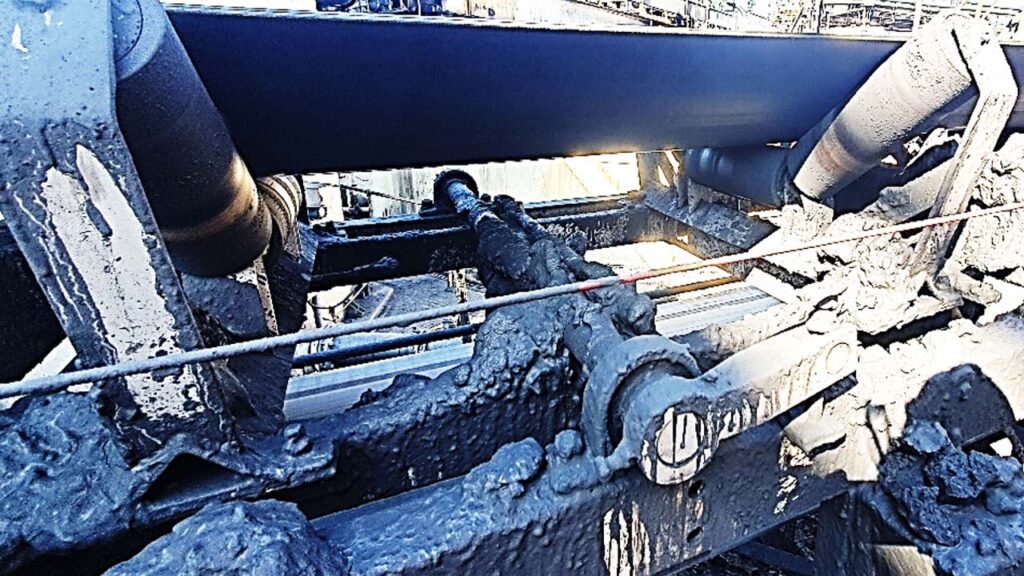
- Build-up and binds. Heavy accumulation on the carriage, material packed under the weigh idlers so rollers cannot turn cleanly, or a wedge between the frame and stringer that stops the platform floating. We clean it off, free every contact point, and confirm the platform moves freely before calibrating.
- Carryback. Material carried back on the belt underside past worn or poorly set scrapers lands in the weigh zone as tare. The lasting fix is upstream: get the scrapers cleaning properly.
- Roller and idler condition. A seized or dragging idler in or next to the weigh zone, or a change of roller type, shifts the zero.
- Belt tracking. A belt running off-centre edge-loads the weigh idlers and moves the zero. Correct tracking at the conveyor; do not dial it out at the integrator.
- Belt tension and lift. On curved or steeply inclined conveyors the belt can lift off the bed rollers for part of each revolution, throwing the zero around. A new belt also beds in over a week or two as it conforms to the structure.
- Tie rods and cams. Tie rods that have shifted or stiffened, or an on-scale cam that has moved a millimetre or so, change how load transfers into the cells.
The fix is mostly mechanical: clean, free off, align, then re-zero. A one-off larger zero change after a proper clean (around one percent) is normal. A zero that keeps walking after cleaning and alignment points to something structural or upstream, and is worth a call, not repeated re-zeroing that only masks it.
Why is the span drifting, or the totals disagreeing with the weighbridge?
Span is the “how much per unit of load” side of the calibration, so span problems and weighbridge disagreements point at the load path and the speed signal, not at cleanliness.
Likely causes, roughly in order:
- Load cell health. We apply known check weights to each cell in turn. A cell reading outside its range, or noticeably different from its partner under the same load, is damaged or has a degraded cable and wants replacing. A sudden step in millivolt output, after which the scale reads linear but offset, is uncommon but real and causes large tonnage errors.
- Speed signal. If the integrator’s belt speed no longer matches a measured speed, every tonne is scaled wrong. We re-time the belt and correct the speed and length parameters.
- Belt changes and splices. A new belt, a replaced section, or a fresh splice changes belt length and mass distribution. Speed and length have to be re-entered and a full recalibration done, or the totals drift.
- Test gear and geometry. When the zero and span move together rather than separately, the cause is usually geometry, a load cell, or the test weights, not build-up. We check the weigh frame geometry, load cell mounting, and the billet weight applicator, because a binding calibration weight fakes a span error directly.
A word on the weighbridge: a belt weigher and a weighbridge never agree perfectly, and a gap does not prove the weigher is the one that moved. Pinning down true accuracy needs an independent reference such as a stockpile survey or a plant material balance.
Why are the totals jumpy or erratic?
Jumpy or spiking totals are usually an electrical or dynamic problem, not a calibration one. The give-away often shows up before the readings drift: repeatability gets worse first, so runs that used to land on top of each other start to scatter.
What we look for:
- Load cell cables and connections. A nicked cable sheath, a corroded terminal, or a load cell starting to fail sends erratic signals into the integrator.
- Junction box moisture. Water in the load cell or speed sensor junction box is one of the most common causes of erratic behaviour on wet sites. We dry and reseal it, but the real fix is stopping the ingress, or replacing a box whose seals have had it.
- Speed sensor slip. A speed pickup that slips, especially on a wet belt, injects noise straight into the measured rate.
- Vibration. A noisy roller just before, just after, or on the return under the weigh area shakes the frame and scatters the readings, as does a tired conveyor structure or a return roller inside the weigh span.
- Electrical interference and drives. Variable speed drives and poorly separated cable runs can couple noise into the signal.
The order is the same each time: protect the wiring, seal out moisture, replace the noisy roller or slipping sensor, then recalibrate. Recalibrating over an intermittent electrical fault just bakes the noise in, so diagnose it properly rather than fiddle.
What causes speed sensor problems?
The speed sensor, usually a spiral cage running on the belt, is a common weak point because it lives in the dirt and weather and depends on clean belt contact.
- Worn or seized bearings. Spiral cage bearings go noisy, then seize, and the cage stops turning, at which point the weigher loses speed and reads wrong or reads nothing. Bearings only just noisy can be greased to buy time, but a seized one has to be replaced.
- Lost belt contact. A shifted mounting bracket, or a wheel packed with build-up, lifts the sensor off the belt. We clean it, reset the bracket, and confirm the signal is back.
- Slipping when wet. A cage that grips fine when dry can slip on a wet belt and under-read speed. If it is slipping we recommend replacing it before it fails outright.
- Cold mornings. In cold weather a spiral cage can slip until things warm up, and often just needs adjusting for better contact.
- Proximity switch faults and air gaps. Where speed is picked up by a proximity switch, a failed switch or an incorrect air gap stops the pulses.
The most useful thing a site can do is grease the sensor monthly: the bearings are custom, long lead-time parts, and a stocked spare cage and bearings saves days of downtime when one lets go. If the speed looks wrong, check the sensor is turning and in belt contact before blaming the scale.
What mechanical wear affects accuracy: rollers, idlers, alignment and tie rods?
A belt weigher is a precision mechanical instrument bolted into a heavy, moving conveyor, so mechanical condition matters as much as the electronics.
- Weigh-zone rollers and idlers. The rollers on and around the weigh frame have to be the right quality and in good order. A worn, noisy, or seized roller near the weigh span adds vibration and error, and non-precision lead-in idlers next to the weigh area are a classic source of poor repeatability. We replace worn weigh-zone rollers and, on scales that catch a lot of tramp, sometimes swap plastic rollers for steel where wear is high.
- Alignment. The weigh idlers have to sit in a straight, true line with the surrounding idlers. We align them to a tight target, typically within about 0.3 mm (the exact target depends on the scale). Idlers a few millimetres out quietly cost accuracy that no calibration can recover.
- Tie rods. Tie rods locate the weigh frame and have to move freely so it can deflect onto the load cells. They bind when they corrode or pack with dirt, and because they sit in mine water the rod ends and spherical washers corrode over time. We clean, grease, and wrap them (denso tape or similar), adjust them for free movement, and replace rod ends before they seize. A frame that cannot deflect freely cannot weigh accurately.
Most of this is inspection and replacement work, best done at a service or shutdown. A weigher that suddenly goes off after a roller change, shutdown, or nearby structural work has probably moved and wants realigning, not recalibrating.
How does weather affect a belt weigher?
Weather does not read the scale directly, but it drives several of the faults above, so we treat a wet or very hot lead-up as a signal to look harder, never as proof on its own.
- Wet weather. A wet week before a service raises the build-up and carryback risk sharply. As a rough guide we take notice when the prior week has had heavy rain (of the order of 50 mm and up, with 20 mm-plus worth a look). Wet product and water add mass, so a zero that moves after a wet spell often reflects build-up or moisture, not a scale fault. Tie rods and speed sensors also misbehave more in the wet.
- Heat. On very hot days (roughly 38 °C and above) heat can affect the load cells and integrator electronics, and a big temperature swing between calibration runs shows up as poorer repeatability.
None of these prove a cause; they tell us where to look first. If a weigher only misbehaves through the wet season, the answer is usually better cleaning access and belt cleaning upstream.
When is it the integrator, not the scale?
Sometimes the mechanics and load cells are fine and the fault sits in the integrator, the electronics that turn the signals into tonnes. Worth ruling out before pulling the weigh frame apart.
- It has reset or lost settings. After a long power outage an integrator can drop its parameters or its totaliser, and it needs reprogramming and recalibrating.
- A/D or input faults. A failed analogue-to-digital channel, or a load cell input that reads wrong until the connections are moved to a spare port, points at the unit rather than the cells. Some faults clear with a power cycle and then want watching in case they return.
- Keypad, display or battery. Unresponsive keys, a heat-damaged display, or a flat memory battery make calibration awkward or risk losing the totaliser, and are usually a straight replacement.
- Comms dropouts. If the tonnes look right on the integrator but wrong in the plant control system, the fault is often in the totaliser pulse output or the communications link, not in the weigher at all.
The fix ranges from a settings check and power cycle to a full integrator swap with the parameters transferred across. We supply parts for every major belt weigher brand: a genuine part where it’s available, or a suitable alternative, with compatibility confirmed and the part identified on the quote, so a swap is rarely held up waiting on one supplier. It is worth a call when the scale calibrates fine and repeats well but the numbers still do not make sense, or an error keeps returning.
Frequently asked questions
How often should a belt weigher be calibrated?
Most sites we look after run a routine service and calibration every 12 weeks, with roller changes at shutdowns. Duty, product, and how much the readings matter shift that interval. A stable scale can often go longer between calibrations; one that drifts wants watching more closely. Every scale we look after has its interval and next due date in AIMM, our asset management system, so nobody has to remember. See how often a belt weigher should be calibrated.
Why does my belt weigher read differently to the weighbridge?
A belt weigher and a weighbridge are different measurements and will never match exactly, so a gap does not prove the weigher is wrong. If the difference is bigger than you are comfortable with, check both against an independent reference such as a stockpile survey or plant material balance to see which one moved.
Can I fix a belt weigher fault myself?
You can help a lot by keeping the weigh area clean, greasing the speed sensor, and keeping water out of the junction boxes. Anything on or near the belt has to wait until the conveyor is isolated, and calibration and load cell work need the right training and gear. If in doubt, isolate it, leave it, and call us.
Need a manual for your equipment?
Talk to us about manuals for your equipment. Send the make, model, serial number and software version (a photo of the label is fine) and we’ll help you find the right document.